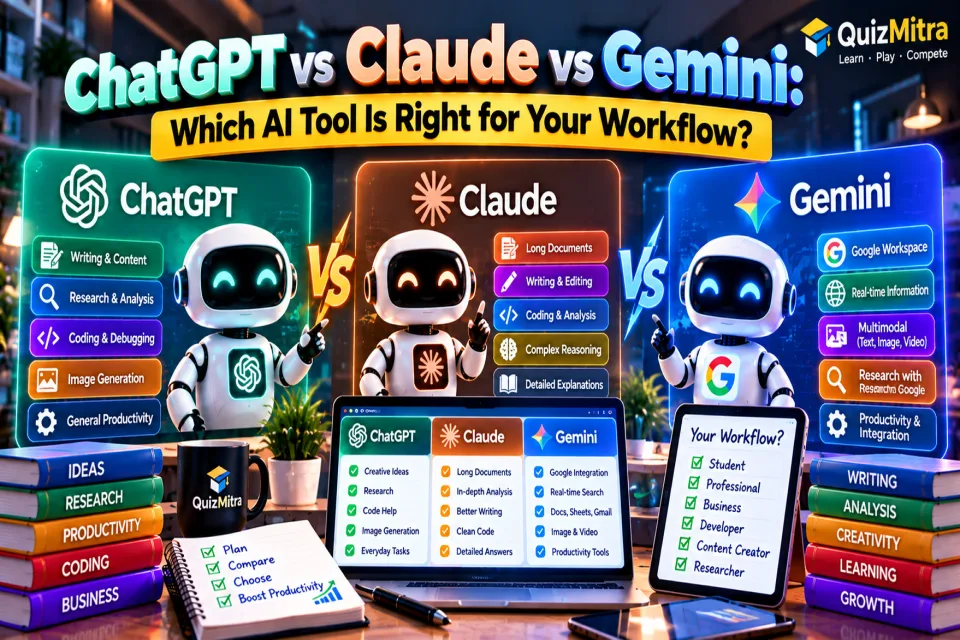
ChatGPT, Claude, and Gemini are three of the most popular AI assistants in 2026. All three can help with writing, research, coding, brainstorming, document analysis and everyday work. The real question is not simply which one is “best” — it is which AI tool fits your workflow best.
ChatGPT has developed into a broad AI workspace with web search, deep research, projects, file handling, image generation and other tools. :chatgpt-content-reference{index="0"} Claude is particularly interesting for long-form knowledge work, coding and document-heavy workflows, while Gemini has a major advantage for people already working inside Google's ecosystem.
In this guide, we compare ChatGPT vs Claude vs Gemini across practical use cases so you can choose the tool that makes the most sense for your daily work.
Table of Contents
- ChatGPT vs Claude vs Gemini at a Glance
- What Is ChatGPT Best For?
- What Is Claude Best For?
- What Is Gemini Best For?
- ChatGPT vs Claude vs Gemini Comparison
- Best AI Tool for Writing
- Best AI Tool for Coding
- Best AI Tool for Research
- Best AI Tool for Students
- Best AI Tool for Business
- Best AI Tool for Google Users
- Which AI Tool Should You Choose?
- How to Use More Than One AI Tool
- Frequently Asked Questions
- Final Verdict
ChatGPT vs Claude vs Gemini at a Glance
There is no universal winner. Each assistant has a slightly different personality, ecosystem and workflow advantage.
| AI Tool | Best For | Major Strength | Good Choice If... |
|---|---|---|---|
| ChatGPT | General productivity | Broad capabilities and flexible workflows | You want one AI assistant for many different tasks |
| Claude | Writing, coding & long documents | Strong reasoning and knowledge-work workflows | You work heavily with documents, code or detailed analysis |
| Gemini | Google ecosystem | Integration with Google products and services | Your work already happens in Gmail, Docs, Drive and Sheets |
The best AI assistant is the one that fits the way you already work.
What Is ChatGPT Best For?
ChatGPT is positioned as a broad, general-purpose AI assistant. It can answer questions, explain concepts, draft and rewrite content, analyze files, work with images, search the web and support more complex research workflows. :chatgpt-content-reference{index="1"}
One of its biggest advantages is the number of different workflows that can be handled from one interface. Projects can keep chats, files and instructions together, while Deep Research can research multiple sources and produce a documented report with citations. :chatgpt-content-reference{index="2"}
ChatGPT is a strong choice for:
- General-purpose AI assistance
- Content writing and editing
- Research and information synthesis
- Brainstorming and strategy
- Programming and debugging
- Image generation and visual work
- Working with documents and files
- Long-running projects
- Learning and education
For users who don't want to maintain several specialized AI tools, ChatGPT can function as an all-round AI workspace.
What Is Claude Best For?
Claude, developed by Anthropic, is another major general-purpose AI assistant, with a particularly strong reputation around writing, coding, reasoning and document-heavy work.
Anthropic has continued expanding Claude's ability to handle longer and more complex tasks. For example, Claude Opus 4.6 introduced a 1-million-token context window in beta and improvements for coding, code review, debugging, research and working with documents, spreadsheets and presentations. :chatgpt-content-reference{index="3"}
Claude has also developed research and workplace integrations. Anthropic describes its Research capability as an agentic workflow that can perform multiple searches and reason across information sources. :chatgpt-content-reference{index="4"}
Claude is a strong choice for:
- Long-form writing
- Editing and rewriting
- Large documents
- Code review
- Software development
- Detailed reasoning
- Research-heavy workflows
- Knowledge work
- Complex documentation
What Is Gemini Best For?
Gemini is Google's AI assistant and becomes especially interesting when your workflow already depends heavily on Google products.
Gemini's Deep Research can use Google Search by default and can also incorporate sources such as Gmail and Drive when connected. It can create a research plan, analyze sources and produce a research report. :chatgpt-content-reference{index="5"}
Google has also expanded Gemini inside Workspace. Newer features allow Gemini to work with Docs, Sheets and Drive, including helping create spreadsheets, analyze information and connect relevant information from files, email and the web. :chatgpt-content-reference{index="6"}
Gemini can also generate files such as PDFs, Word documents, Excel files and Google Workspace files directly from the Gemini experience. :chatgpt-content-reference{index="7"}
Gemini is a strong choice for:
- Google Workspace users
- Gmail workflows
- Google Docs and Sheets
- Google Drive research
- Web research
- Multimodal tasks
- Creating documents and files
- Students already using Google services
- Google-centric business workflows
ChatGPT vs Claude vs Gemini: Detailed Comparison
| Use Case | ChatGPT | Claude | Gemini |
|---|---|---|---|
| General AI assistant | Excellent | Excellent | Excellent |
| Writing | Excellent | Excellent | Very good |
| Long documents | Excellent | Excellent | Very good |
| Coding | Excellent | Excellent | Very good |
| Research | Excellent | Excellent | Excellent |
| Google ecosystem | Good | Good | Excellent |
| Image workflows | Excellent | More limited depending on workflow | Excellent |
| Business productivity | Excellent | Excellent | Excellent |
These ratings are best understood as workflow guidance rather than laboratory scores. AI models and product features change frequently, so the right choice can change with your task, plan and preferred ecosystem.
Which Is Best for Writing?
If your work involves blog posts, reports, emails, scripts, documentation or rewriting, all three can be useful.
Claude is particularly attractive when your priority is careful long-form writing, editing and working through large amounts of text.
ChatGPT is a strong choice when writing is only one part of a larger workflow involving research, brainstorming, files, images or other tasks.
Gemini makes a lot of sense if your writing already lives inside Google Docs, Gmail and Drive.
Winner for writing: Claude for text-heavy workflows, with ChatGPT and Gemini close behind depending on your ecosystem.
Which Is Best for Coding?
All three assistants can help developers understand code, generate code, debug problems, explain errors and work through technical questions.
Claude has invested heavily in coding and agentic development workflows. Anthropic says Claude Opus 4.6 improved code planning, long-running agentic tasks, code review and debugging, while newer Claude models continue to target coding and knowledge work. :chatgpt-content-reference{index="8"}
ChatGPT is attractive for developers who want coding combined with research, explanation, file analysis and broader productivity workflows.
Gemini is useful for developers who already rely heavily on Google services and Google's broader development ecosystem.
Winner: There is no universal winner. Claude is particularly compelling for code-heavy and large-codebase workflows, while ChatGPT is a strong all-round choice.
Which Is Best for Research?
Research is one area where the three platforms increasingly overlap.
ChatGPT's Deep Research is designed for multi-step research, allowing users to select sources, review a research plan and receive a structured report with citations. :chatgpt-content-reference{index="9"}
Claude also offers Research workflows that can conduct multiple searches and synthesize information from the web and connected work context. :chatgpt-content-reference{index="10"}
Gemini Deep Research has a natural advantage for people who want Google Search combined with connected Google sources such as Gmail and Drive. :chatgpt-content-reference{index="11"}
Best approach: choose the research tool based on where your information already lives rather than assuming one AI will always produce the best answer.
Which Is Best for Students?
Students can use all three for explaining difficult concepts, creating study notes, brainstorming, summarizing material, practicing questions and preparing for exams.
- ChatGPT: excellent for explanations, study planning, practice and broad learning workflows.
- Claude: useful for long documents, detailed explanations and writing-heavy assignments.
- Gemini: especially convenient for students already using Google Docs, Drive and other Google services.
The best student workflow is not simply asking AI for answers. Use AI to understand concepts, generate practice questions, identify gaps and review your own work.
For quiz-based practice, learners can also explore the educational quizzes and mock tests available on QuizMitra.
Which Is Best for Business?
Businesses should think beyond chatbot quality. The better question is: Which AI fits our existing systems, documents and team workflows?
Choose ChatGPT if:
- You want a broad AI productivity assistant.
- Your team works across many different types of tasks.
- You need research, writing, analysis and creative workflows in one place.
Choose Claude if:
- Your team works heavily with documents.
- Software development is a major part of your workflow.
- You value detailed analysis and long-form knowledge work.
Choose Gemini if:
- Your company already uses Google Workspace heavily.
- Your workflow revolves around Gmail, Docs, Sheets and Drive.
- You want AI closely connected to Google's ecosystem.
Best AI Tool for Google Users
If your daily workflow starts with Gmail, Google Docs, Google Sheets and Google Drive, Gemini deserves serious consideration.
Google continues to expand Gemini's integration with Workspace. Recent updates include AI-assisted spreadsheet creation, document workflows, Drive research and information retrieval across connected sources. :chatgpt-content-reference{index="12"}
Google has also introduced more agentic capabilities and connected services around Gemini, making the ecosystem increasingly focused on completing tasks rather than simply answering questions. :chatgpt-content-reference{index="13"}
Which AI Tool Should You Choose?
Use this simple decision framework:
| Your Main Need | Recommended Starting Point |
|---|---|
| One AI for many different tasks | ChatGPT |
| Long-form writing and document work | Claude |
| Coding and code review | Claude / ChatGPT |
| Google Workspace productivity | Gemini |
| Deep research | ChatGPT / Claude / Gemini |
| Students and learning | ChatGPT / Gemini |
| Business productivity | ChatGPT / Claude / Gemini |
Should You Use More Than One AI Tool?
You don't necessarily need to choose only one.
A practical workflow can use different AI assistants for different stages of a project. For example, you could use one tool for initial research, another for reviewing a long document, and another for creating a final presentation or working inside your existing productivity ecosystem.
The important thing is to avoid creating unnecessary complexity. If switching between three AI tools takes more time than it saves, the multi-tool workflow is probably not worth it.
Don't collect AI tools. Build an AI workflow.
Frequently Asked Questions
Is ChatGPT better than Claude?
Not universally. ChatGPT is a strong all-round AI workspace, while Claude can be especially attractive for long-form writing, coding and document-heavy work.
Is Claude better than Gemini?
It depends on the workflow. Claude can be a strong choice for writing, coding and detailed knowledge work, while Gemini has a major advantage when your work is deeply connected to Google products.
Is Gemini better than ChatGPT?
Neither is universally better. Gemini is particularly compelling for Google ecosystem users, while ChatGPT offers a broad collection of AI capabilities and workflows.
Which AI is best for students?
ChatGPT, Claude and Gemini can all be useful for students. The best choice depends on whether your priority is general learning, long documents, writing or Google Workspace.
Which AI is best for coding?
Claude and ChatGPT are both strong starting points for coding. Your development environment, project size and preferred workflow should influence the final choice.
Can I use ChatGPT, Claude and Gemini together?
Yes. Using multiple assistants can make sense when each one has a specific role in your workflow. However, start with one primary tool before adding more.
Final Verdict: ChatGPT vs Claude vs Gemini
ChatGPT, Claude and Gemini are all excellent AI assistants in 2026. The biggest mistake is choosing one purely because someone calls it the “best AI.”
Instead, look at your actual workflow.
- Choose ChatGPT if you want a versatile AI assistant that can handle a wide range of tasks.
- Choose Claude if your work is heavily focused on writing, coding, documents and detailed analysis.
- Choose Gemini if Google Workspace is already at the center of your daily work.
And remember: AI should reduce the amount of repetitive work you do, not create another complicated system to manage.
For more AI tools, categories and practical resources, explore the QuizMitra AI Tools Directory and discover tools for writing, coding, image generation, video, SEO, education, productivity and business.
Quiz Mitra — Learn. Play. Compete.