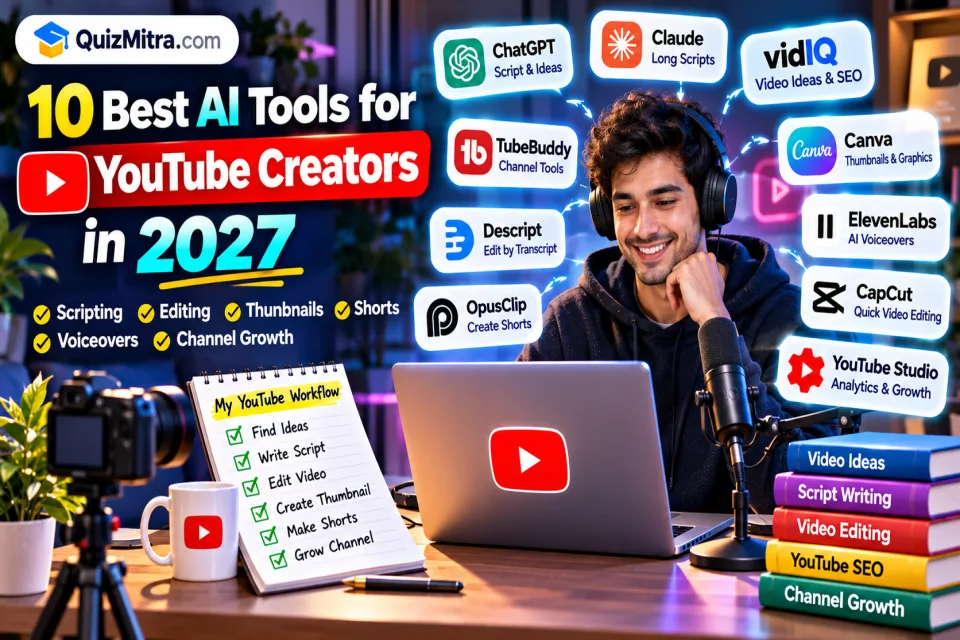
Running a YouTube channel involves much more than recording a video. Creators need to research topics, write scripts, edit footage, design thumbnails, create Shorts, and understand what their audience wants to watch next.
AI tools can help simplify parts of this workflow. Some support idea generation and YouTube SEO, while others help edit footage, create captions, generate voiceovers, or turn long videos into short clips.
In this guide, we explore the best AI tools for YouTube creators in 2027, organized by the job each tool can help with. Features, pricing, and free-plan limits can change, so check each provider’s current details before subscribing.
Quick Picks
- Video ideas and channel research: vidIQ or TubeBuddy
- Scripts and outlines: ChatGPT or Claude
- Editing talking-head videos: Descript
- Creating Shorts from long videos: OpusClip
- Thumbnails and channel graphics: Canva
- Voiceovers: ElevenLabs
Table of Contents
1. Why Use AI for YouTube?
AI can reduce repetitive work, but it does not replace a creator’s point of view, storytelling, or understanding of their audience. The best use of AI is to speed up tasks while keeping creative decisions and final quality under your control.
- Research: Brainstorm topics and organize questions viewers may have.
- Scripting: Build an outline, improve clarity, or draft an opening hook.
- Editing: Remove pauses, edit transcripts, or create captions.
- Repurposing: Find short clips from longer videos.
- Design: Create thumbnail concepts, graphics, and channel assets.
- Audio and language: Improve voice quality or prepare translations and dubbing.
2. 10 Best AI Tools for YouTube Creators in 2027
1. vidIQ — Best for Video Ideas and YouTube SEO
vidIQ offers tools for researching video topics, keywords, and channel performance. It can help creators explore what to make and improve how they package a video.
- Research topics and search terms related to your niche.
- Brainstorm titles and video ideas.
- Review channel and video performance insights.
Best for: Creators who want help with planning and discovery.
Keep in mind: Keyword suggestions are inputs for your own judgment, not a guarantee of views or rankings.
2. TubeBuddy — Best for YouTube Channel Management
TubeBuddy provides YouTube-focused tools for channel optimization and workflow support. Depending on the current plan, features may include help with metadata, testing, and managing videos.
- Review titles, descriptions, and video metadata.
- Support repeatable channel-management tasks.
- Use available testing features to compare packaging choices.
Best for: Creators who publish regularly and want a more structured channel workflow.
Keep in mind: Check current plan availability for specific tools before relying on them.
3. ChatGPT — Best for Scripts and Content Planning
ChatGPT can help brainstorm video ideas, organize research, create script outlines, and rewrite sections for clarity.
- Generate topic angles for a specific audience.
- Create a script outline with a hook, main points, and conclusion.
- Draft questions for interviews or audience polls.
- Repurpose a video transcript into a description or newsletter draft.
Best for: Creators who want a flexible writing and planning assistant.
Keep in mind: Fact-check claims and add your own examples, opinions, and experience before recording.
4. Claude — Best for Drafting and Reviewing Longer Scripts
Claude can help organize longer drafts, refine explanations, and review a script for flow and clarity.
- Turn notes into a structured script draft.
- Identify sections that feel repetitive or unclear.
- Adjust explanations for a beginner or specialist audience.
Best for: Educational channels, explainers, and creators working with longer scripts.
Keep in mind: Review all factual claims and keep the final script in your own voice.
5. Descript — Best for Transcript-Based Video Editing
Descript supports editing workflows built around transcripts. It can be useful for talking-head videos, interviews, tutorials, and podcasts.
- Edit spoken content through a transcript-based workflow.
- Prepare captions and improve the pacing of recorded material.
- Make revisions to dialogue-driven videos more efficiently.
Best for: Creators whose videos rely heavily on spoken explanations or interviews.
Keep in mind: Review edits carefully so the video does not lose context or sound unnatural.
6. OpusClip — Best for Turning Long Videos into Shorts
OpusClip helps turn longer recordings into short-form clips. It can identify potential segments and assist with reframing and captions for social video formats.
- Repurpose interviews, podcasts, and long videos into short clips.
- Prepare vertical versions for short-form platforms.
- Use captions and editing assistance to speed up clip preparation.
Best for: Creators who already produce long videos and want to repurpose them.
Keep in mind: Review each clip for context, pacing, and whether it makes sense without the full video.
7. Canva — Best for Thumbnails and Channel Graphics
Canva offers design templates and AI-assisted features that can help creators make thumbnails, banners, and supporting graphics.
- Create thumbnail concepts and channel artwork.
- Use templates to keep a consistent visual style.
- Prepare simple diagrams and graphics for tutorials.
Best for: Creators who want to design visual assets without a complex design workflow.
Keep in mind: Make thumbnail text readable at small sizes and avoid misleading imagery.
8. ElevenLabs — Best for AI Voiceovers
ElevenLabs offers AI voice generation and audio-related tools. Creators may use voiceovers for explainers, narration, or localized content.
- Create narration from a written script.
- Explore voice options for different content formats.
- Support audio production for multilingual projects where appropriate.
Best for: Creators producing narration-heavy videos or testing voiceover workflows.
Keep in mind: Use only voices and voice-cloning features you have the rights and permission to use.
9. CapCut — Best for Fast Short-Form Editing
CapCut provides video-editing features that can support quick edits, captions, and short-form content workflows.
- Edit vertical videos and social clips.
- Add captions and visual effects where supported.
- Prepare content for different aspect ratios.
Best for: Creators who make Shorts and want an accessible editing workflow.
Keep in mind: Check current export options, licensing terms, and availability in your region.
10. YouTube Studio — Best for Native Creator Tools and Analytics
YouTube Studio is the main place to manage uploads and review channel performance. YouTube continues to add creator-facing features, but availability can vary by account, region, and rollout.
- Review performance and audience analytics.
- Manage video details, comments, and publishing.
- Check which native creator features are available in your account.
Best for: Every creator, as a starting point for publishing and reviewing performance.
Keep in mind: Confirm feature availability in your own Studio rather than assuming every account has the same tools.
3. AI Tools for YouTube Creators: Comparison Table
| Tool | Best For | Typical Workflow Stage |
|---|---|---|
| vidIQ | Topic ideas and YouTube SEO | Planning |
| TubeBuddy | Channel optimization and management | Publishing |
| ChatGPT | Scripts and brainstorming | Planning and writing |
| Claude | Long-form script drafting | Writing |
| Descript | Transcript-based editing | Editing |
| OpusClip | Long video to Shorts | Repurposing |
| Canva | Thumbnails and graphics | Design |
| ElevenLabs | Voiceovers | Audio |
| CapCut | Short-form editing | Editing |
| YouTube Studio | Publishing and analytics | Channel management |
4. Free AI Tools to Start With
If you are starting a channel or working with a limited budget, begin with tools that offer free access or features included in services you already use. Free-plan limits and availability may change.
- YouTube Studio: Start with native publishing and analytics tools.
- ChatGPT or Claude: Check current free access for brainstorming and script drafts.
- Canva: Explore its free design features for thumbnails and graphics.
- CapCut: Check the current free editing features and export conditions.
- vidIQ or TubeBuddy: Review their free plans for basic channel research and optimization.
5. A Practical AI YouTube Workflow
Step 1: Choose a specific viewer and topic
Define who the video is for and what question it answers. Use research tools to explore related topics, then select an idea that fits your channel.
Step 2: Draft and verify the script
Use an AI assistant to organize your notes into a clear outline. Verify facts, add examples, and rewrite the draft so it sounds like you.
Step 3: Record and edit
Record your own footage or narration, then use an editing tool to help with captions, rough cuts, or transcript-based revisions. Review the final edit for context and accuracy.
Step 4: Create the thumbnail and title
Use design tools to explore visual concepts, but keep the title and thumbnail accurate to the video. Make the main message easy to understand on a small screen.
Step 5: Repurpose only the strongest moments
If the video contains useful standalone moments, use a clipping tool to create Shorts. Check that each clip has enough context to make sense on its own.
Step 6: Review performance and learn
Use YouTube Studio analytics to review how viewers respond. Look for patterns in audience retention, clicks, and comments, then use those insights to inform your next video.
6. Useful AI Prompts for YouTube Creators
Prompt 1: Brainstorm Video Ideas
Suggest 10 YouTube video ideas for a channel about [topic] aimed at [audience]. For each idea, include the viewer's likely question, a clear angle, and why it fits this audience. Avoid exaggerated claims and repetitive topics.
Prompt 2: Create a Script Outline
Create a YouTube script outline about [topic] for [audience]. Include a concise opening hook, the main sections, examples to verify or add, and a useful conclusion. Do not invent statistics or personal experiences.
Prompt 3: Improve a Video Title
Suggest 8 clear, accurate YouTube titles for this video summary: [summary]. Keep them relevant to the actual content. Avoid clickbait, false promises, and claims the video does not support.
7. Responsible AI Use for YouTube
- Fact-check: Verify important claims, statistics, and current information before publishing.
- Respect rights: Use footage, music, images, and voices only when you have permission or a valid license.
- Keep your perspective: Add original commentary, examples, and judgment rather than publishing generic AI output.
- Review generated content: Check captions, edits, translations, and voiceovers for mistakes.
- Follow platform rules: Review YouTube’s current policies and disclosure requirements for altered or synthetic content.
8. Frequently Asked Questions
What is the best AI tool for YouTube creators in 2027?
There is no single best tool for every creator. vidIQ and TubeBuddy can help with channel research, ChatGPT and Claude with scripts, Descript with transcript-based editing, OpusClip with short clips, and Canva with thumbnails.
Can AI create a complete YouTube video?
Some tools can generate or assemble parts of a video, but the result still needs human review. Check the script, visuals, audio, factual accuracy, rights, and whether the video offers genuine value to viewers.
Which AI tool is best for YouTube Shorts?
OpusClip is designed to help repurpose longer videos into short clips, while CapCut can support short-form editing. The right choice depends on whether you need automatic clip selection, editing, captions, or a combination of tasks.
Can AI help with YouTube SEO?
AI-assisted research tools can help brainstorm topics and review titles or metadata. They cannot guarantee rankings or views. Make sure the video answers the viewer’s question and that its title and thumbnail accurately represent the content.
Do I need paid AI tools to start a YouTube channel?
No. Start with the tools and free features you already have access to. Add a paid tool only when it solves a clear problem in your workflow and its current cost makes sense for your channel.
Final Verdict: Build a Small AI Toolkit
You do not need every tool on this list. Start with one tool for your biggest bottleneck—such as scripting, editing, thumbnails, or Shorts—and learn how it fits into your workflow.
AI can make parts of video production faster, but a useful idea, a clear point of view, and respect for your audience are still what make a channel worth watching.
Explore More AI Resources on QuizMitra
Discover tools and prompts that can support your content creation workflow.
Editorial note: This article is for informational purposes. AI tool features, pricing, free-plan limits, and availability may change. Check each provider’s official website and YouTube’s current policies before relying on a feature.