Looking for a job in the United States can involve much more than submitting a resume. You may need to customize your resume for different positions, write cover letters, research employers, prepare for interviews, and track multiple applications at the same time.
In 2027, AI tools can help job seekers handle many of these tasks more efficiently. From resume writing assistants to applicant tracking system (ATS) checkers and AI-powered interview practice platforms, there are tools for nearly every stage of the job search.
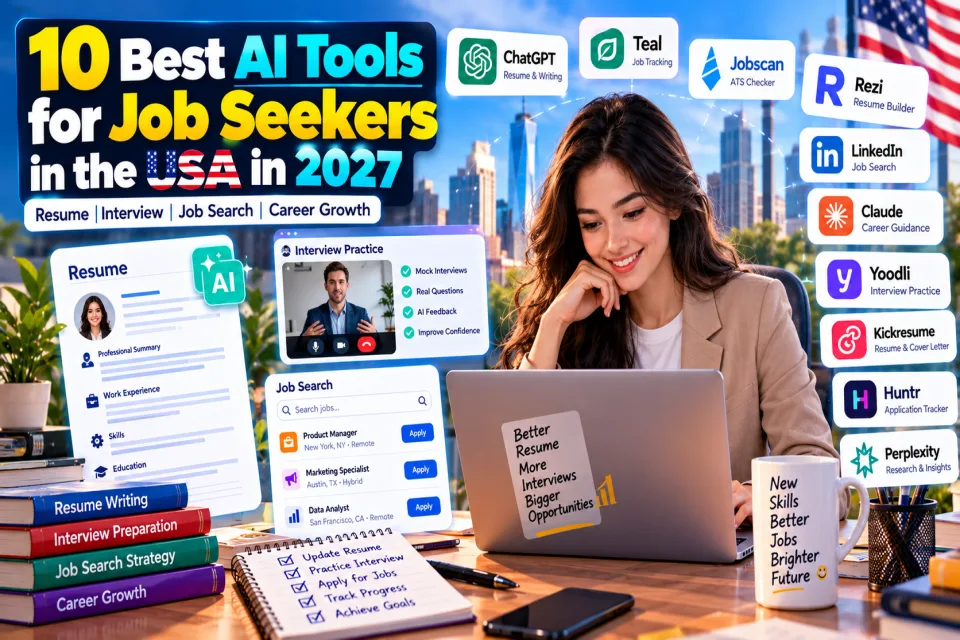
In this guide, we explore the best AI tools for job seekers in the USA in 2027, including their main uses, potential benefits, limitations, and ways to use them responsibly.
Quick Answer: Which AI Tools Should Job Seekers Try?
- ChatGPT: Resume improvements, cover letters, and interview questions.
- Teal: Organizing applications and managing job-search activities.
- Jobscan: Comparing a resume with a specific job description.
- Rezi: AI-assisted resume creation and optimization.
- LinkedIn: Professional networking and job discovery, with some AI features depending on the plan and availability.
- Yoodli: Practicing interviews and improving communication.
Table of Contents
1. Why Use AI for Your Job Search?
AI can help reduce repetitive work during a job search. Instead of starting every application from scratch, you can use AI to organize your experience, identify relevant skills, practice interview responses, and prepare more targeted applications.
However, AI is a support tool, not a guarantee of employment. Your actual qualifications, relevant experience, communication, and the employer's hiring process remain important.
- Resume writing: Improve clarity, structure, and relevance to a specific position.
- Cover letters: Create a first draft based on the job requirements and your real experience.
- Job discovery: Explore roles that match your skills, experience, and career interests.
- Interview preparation: Practice common questions and develop clear examples.
- Application tracking: Record deadlines, job links, interview dates, and follow-up tasks.
- Company research: Prepare questions and understand an employer before an interview.
2. 10 Best AI Tools for Job Seekers in the USA in 2027
1. ChatGPT — Best for Resume Writing and Interview Preparation
ChatGPT is a general-purpose AI assistant that can help you improve resume bullet points, draft cover letters, research career topics, and prepare for job interviews.
What you can do with it:
- Rewrite resume content using clear, professional language.
- Tailor a resume draft to the requirements of a particular job.
- Generate practice behavioral and technical interview questions.
- Prepare STAR-format answers based on your real experiences.
- Draft recruiter messages and follow-up emails.
Best for: Job seekers who want one flexible assistant for writing, preparation, and research.
Keep in mind: Review every output carefully. ChatGPT cannot guarantee interviews or verify every employer detail without reliable supporting information.
2. Teal — Best for Resume Tailoring and Job Tracking
Teal offers job-search organization and resume-related features. It can help candidates keep application information together instead of relying on scattered notes and spreadsheets.
- Organize job applications and their status.
- Keep track of role details and application progress.
- Work on resume versions for different opportunities.
- Manage job-search tasks in a more structured way.
Best for: People applying to multiple jobs who need a consistent tracking process.
Keep in mind: Check which features are included in the current free and paid plans before subscribing.
3. Jobscan — Best for ATS Resume Checks
Jobscan helps compare resume content with a specific job description. This can help identify missing relevant skills, terminology, and qualifications before you apply.
- Compare a resume with a job posting.
- Identify relevant keywords that may be missing.
- Review how closely your experience matches the role requirements.
- Find areas that may need clearer wording.
Best for: Candidates applying to roles that use applicant tracking systems (ATS).
Keep in mind: An ATS match score is not an employer's actual hiring decision or a guarantee that a resume will pass screening.
4. Rezi — Best for AI-Assisted Resume Building
Rezi focuses on resume creation and optimization. It can help candidates structure resume sections and create content suited to professional applications.
- Create a structured resume draft.
- Improve descriptions of relevant work experience.
- Review resume wording and job-related keywords.
- Build targeted resume versions for different roles.
Best for: Recent graduates, career changers, and candidates who need help organizing their resumes.
Keep in mind: Always check the final formatting and make sure every claim accurately reflects your background.
5. LinkedIn — Best for Networking and Job Discovery
LinkedIn Jobs helps job seekers discover openings, research companies, and connect with professionals. Certain AI-assisted career features may depend on your location, account, or subscription.
- Search for jobs by title, location, and experience level.
- Follow employers and learn about their work.
- Connect with relevant professionals and recruiters.
- Improve your professional profile and highlight relevant projects.
Best for: Professionals who want to combine job searching with networking.
Keep in mind: A polished profile does not replace direct applications or genuine professional relationships.
6. Claude — Best for Detailed Writing and Career Documents
Claude can help review long documents, refine written material, and organize information about your experience and career goals.
- Improve resume summaries and professional biographies.
- Review cover letters for clarity and relevance.
- Turn detailed work notes into concise achievement statements.
- Practice explaining complex projects in simpler language.
Best for: Candidates who have substantial experience or need help refining longer career documents.
Keep in mind: Check the wording for accuracy, and do not include confidential information from a current or former employer.
7. Huntr — Best for Managing Multiple Applications
Huntr provides job-search organization and resume-related features. A dedicated tracker can make it easier to see which applications need attention.
- Organize job opportunities and application stages.
- Keep important job details in one place.
- Manage follow-up reminders and next steps where supported.
- Coordinate resume versions with specific applications.
Best for: Active job seekers managing many applications at once.
Keep in mind: Confirm the available tracking and AI features in the current plan.
8. Kickresume — Best for Resume Design and Cover Letters
Kickresume offers resume and cover-letter creation tools, including templates and AI-assisted writing features.
- Build a visually polished resume.
- Draft a cover letter for a particular role.
- Organize education, skills, and experience into readable sections.
- Choose a layout appropriate for your industry.
Best for: Applicants who want help creating a professional-looking career document.
Keep in mind: Avoid overly decorative layouts when a simple, readable resume is more appropriate for the employer or application system.
9. Yoodli — Best for Interview Communication Practice
Yoodli provides AI-assisted communication and role-play practice. Depending on the available features, users can rehearse responses and review aspects of their delivery.
- Practice answering interview questions aloud.
- Improve the structure and clarity of responses.
- Rehearse professional introductions and presentations.
- Build confidence through repeated practice.
Best for: Candidates who want to improve spoken communication before an interview.
Keep in mind: AI feedback is guidance, not a definitive measure of interview performance.
10. Perplexity — Best for Company and Industry Research
Perplexity is an AI-powered research assistant that can help you investigate companies, industries, and career-related questions using linked sources.
- Research an employer before an interview.
- Explore an industry's products, customers, and recent developments.
- Prepare informed questions for a hiring manager.
- Compare career paths and learn unfamiliar terminology.
Best for: Candidates who want to prepare for interviews and make better-informed career decisions.
Keep in mind: Open the cited sources and confirm important details, especially company news, salaries, and job requirements.
3. AI Job Search Tools Comparison
Use this table to choose a tool based on the specific part of your job search you want to improve. Features and free-plan limits may change.
| AI Tool | Best Use | Who Should Try It? |
|---|---|---|
| ChatGPT | Writing and interview preparation | Most job seekers |
| Teal | Resume tailoring and tracking | Frequent applicants |
| Jobscan | Resume-to-job description comparison | ATS-conscious applicants |
| Rezi | Resume creation and optimization | Graduates and career changers |
| Networking and job discovery | Professionals building connections | |
| Claude | Detailed writing and document review | Applicants refining career documents |
| Huntr | Application organization | People managing multiple opportunities |
| Kickresume | Resume design and cover letters | Applicants creating career documents |
| Yoodli | Spoken interview practice | People improving communication |
| Perplexity | Company and industry research | Candidates preparing for interviews |
4. Free AI Tools for Job Seekers
If you are on a limited budget, start with tools that offer free access or useful free features. Do not pay for several subscriptions before understanding what you actually need.
- ChatGPT: Start with resume feedback, cover-letter drafts, and mock interview questions.
- Claude: Explore its available free access for writing and document review.
- LinkedIn: Use job search, profile features, and networking tools available on your account.
- Teal: Check the free job-tracking and resume features available in its current plan.
- Jobscan: Review the current free scan allowance and other limits before relying on it.
- Perplexity: Use available search and research access to prepare for employers and interviews.
5. How to Use AI to Find a Job in 2027
A practical workflow is more useful than using many AI tools without a clear goal. Follow these steps to make your job search more organized.
Step 1: Define Your Target Role
Choose a target job title, experience level, location, and a realistic list of skills. If you are unsure about your direction, use an AI assistant to compare roles based on your actual background and interests.
Step 2: Prepare Your Master Resume
Create one accurate resume containing your real experience, education, skills, projects, and measurable achievements. Treat this as your source document rather than sending the same version to every employer.
Step 3: Tailor Your Application
Read each job description carefully. Use an AI assistant to identify relevant experience and improve wording. Include keywords only when they truthfully describe your abilities.
Step 4: Research the Employer
Review the employer's official website, role description, and recent reliable announcements. Prepare two or three thoughtful questions that relate to the position and team.
Step 5: Practice the Interview
Ask AI to conduct a mock interview for your target role. Answer in your own words, then review whether your examples clearly explain the situation, action, and result.
Step 6: Track Applications and Follow-Ups
Record the company, role, application date, job link, resume version, current status, and next action. Follow up professionally when appropriate, and keep track of interviews and feedback.
6. Useful AI Prompts for Job Seekers
Use these prompts with an AI assistant. Replace the bracketed text with your actual information.
Prompt 1: Improve My Resume
Act as a resume editor. Review my resume for the role of [job title]. Improve clarity, grammar, and relevance to the job description. Use only my real experience and skills. Do not invent achievements, qualifications, employers, or metrics. Explain the main changes you recommend.
Prompt 2: Customize My Cover Letter
Draft a concise cover letter for [job title] at [company]. Use my experience below and the job description provided. Explain how my actual skills relate to the role. Keep the tone professional and natural, and do not claim experience I do not have.
Prompt 3: Practice a Job Interview
Act as an interviewer for a [job title] position. Ask me one question at a time, starting with common interview questions and moving to role-specific questions. Wait for my answer before asking the next question. After each answer, give constructive feedback and suggest how I can make it clearer using my real experience.
Prompt 4: Analyze a Job Description
Analyze this job description and compare it with my resume. List the required skills I already demonstrate, the requirements that are unclear, and the genuine gaps I may need to address. Do not assume I have skills that are not shown in my resume.
7. Common Mistakes to Avoid When Using AI for Job Hunting
- Inventing experience: Never let AI add fake jobs, degrees, certifications, projects, or achievements.
- Sending identical applications: Adapt your resume and cover letter to the actual position.
- Overusing keywords: Relevant language helps communicate fit, but keyword stuffing can make your resume difficult to read.
- Trusting every answer: Check company information, salary estimates, job details, and advice against reliable sources.
- Ignoring privacy: Avoid uploading confidential employer information, sensitive personal documents, or unnecessary identifiers to AI services.
- Automating without review: Check applications and messages before submission. Follow job-board rules and employer instructions.
- Using AI during interviews without permission: Follow the employer's rules and do not misrepresent AI-generated responses as unaided work when that matters.
8. Frequently Asked Questions
What is the best AI tool for job seekers in the USA in 2027?
There is no single best tool for everyone. ChatGPT is useful for flexible writing and interview preparation, Teal and Huntr help organize applications, Jobscan focuses on resume-to-job comparisons, and Yoodli supports communication practice.
Can AI help me create an ATS-friendly resume?
Yes. AI writing assistants and resume tools can help improve structure, clarity, and relevant keywords. Use a simple, readable format and make sure every detail is accurate. No tool can guarantee that an employer's ATS will select your resume.
Are there free AI tools for job seekers?
Yes. Some services offer free plans or limited free features. Examples include ChatGPT, Claude, LinkedIn, Teal, Jobscan, and Perplexity. Check each provider's current terms and limits before use.
Can AI write a cover letter for me?
AI can draft a cover letter using your real experience and a job description. Review and personalize the result so it reflects your actual qualifications and explains why you are interested in the position.
Can AI guarantee that I will get a job?
No. AI can help you prepare and organize your search, but it cannot guarantee an interview or offer. Hiring decisions depend on many factors, including qualifications, experience, employer needs, and competition.
Should I pay for an AI job search tool?
Start with free features and identify a specific problem before paying. A subscription may be worthwhile if it provides a useful feature you regularly need, but compare the cost, limits, cancellation policy, and alternatives first.
Final Verdict: Which AI Job Search Tool Should You Choose?
The best AI job-search setup is the one that solves your biggest challenge without making your process unnecessarily complicated.
- For writing and preparation: Start with ChatGPT or Claude.
- For resume matching: Try Jobscan or Rezi.
- For application tracking: Explore Teal or Huntr.
- For networking: Use LinkedIn.
- For interview communication: Practice with Yoodli.
- For company research: Use Perplexity and verify important details from original sources.
You do not need every tool on this list. Choose two or three that address your needs, keep your applications accurate, and spend time preparing for the actual work required by your target role.
Explore More AI Resources on QuizMitra
Discover more AI tools and practical resources to support your learning, productivity, and career development.
Editorial note: This guide is intended for informational purposes. AI tool features, free-plan limits, pricing, and availability may change. Confirm current details on each provider's official website before making a purchase or relying on a feature.