Teachers spend a significant amount of time preparing lesson plans, creating worksheets, writing quiz questions, checking assignments, and finding new ways to engage students. These responsibilities can make it difficult to focus on what matters most: helping students learn.
Artificial intelligence (AI) is changing how educators prepare and organize their work. AI-powered tools can help teachers draft lesson plans, generate practice questions, adapt reading materials, create presentations, and provide feedback.
In this guide, we explore the best AI tools for teachers in 2027, including tools for lesson planning, quiz creation, classroom activities, worksheets, grading, and teaching productivity.
Quick Picks: Best AI Tools for Teachers
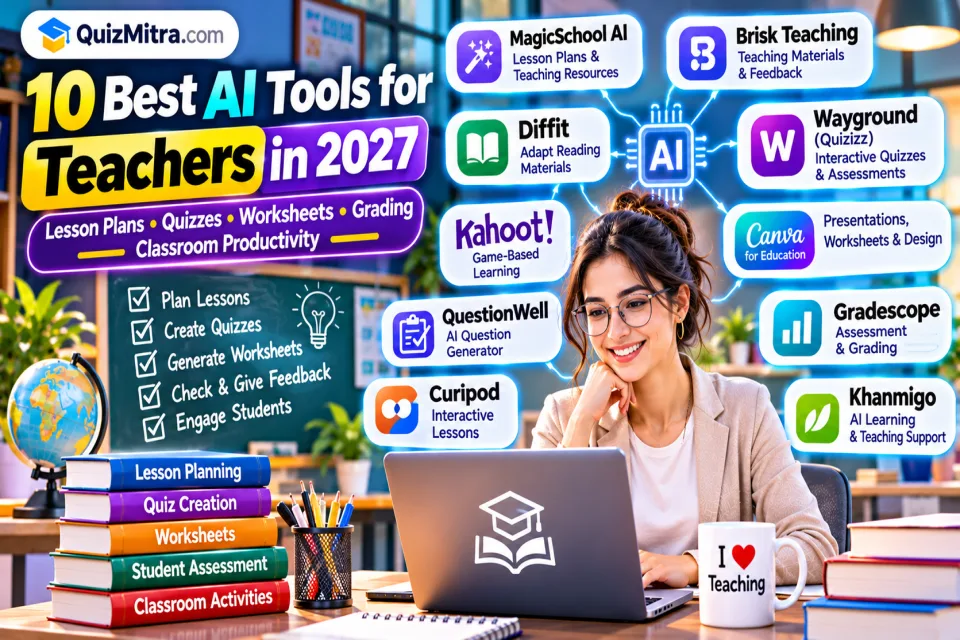
- MagicSchool AI: Teacher-focused lesson planning and classroom resources.
- Brisk Teaching: AI assistance for teaching materials and feedback.
- Diffit: Adapting learning materials for different reading levels.
- Wayground (formerly Quizizz): Interactive quizzes and assessments.
- Kahoot!: Game-based classroom learning.
- Canva for Education: Presentations, worksheets, and classroom designs.
- Gradescope: Assignment and assessment grading workflows.
Table of Contents
1. Why Are Teachers Using AI in 2027?
AI can help teachers reduce repetitive preparation work and create a starting point for educational resources. Instead of writing every question, worksheet, or lesson outline from scratch, teachers can use AI-generated drafts and improve them according to their students' needs.
Here are some common ways educators use AI:
- Lesson planning: Create lesson outlines, learning objectives, and classroom activities.
- Quiz creation: Generate multiple-choice questions, practice tests, and revision activities.
- Worksheets: Prepare exercises, reading materials, and homework drafts.
- Personalized learning: Adapt explanations and reading materials for different learning levels.
- Presentations: Create slides, diagrams, and visual learning resources.
- Assessment support: Prepare rubrics and draft feedback for student work.
- Classroom engagement: Build interactive activities and quiz-based learning experiences.
AI should support a teacher's professional judgment. It should not independently decide student grades, replace meaningful feedback, or determine what a student is capable of learning.
2. 10 Best AI Tools for Teachers in 2027
1. MagicSchool AI — Best for All-in-One Teacher Assistance
MagicSchool AI is an education-focused platform designed to support teachers with a variety of classroom preparation tasks.
What teachers can do:
- Prepare lesson plan drafts.
- Create classroom activities and teaching resources.
- Generate worksheet and assessment drafts.
- Prepare rubrics and feedback suggestions.
- Adapt educational content for different classroom needs.
Best for: Teachers who want multiple teaching-support tools in one platform.
Important: Review generated materials for curriculum alignment, accuracy, age appropriateness, and school requirements.
2. Brisk Teaching — Best for Everyday Teaching Workflows
Brisk Teaching offers AI-assisted tools that can support educators while working with teaching materials and digital content.
- Assist with creating lesson materials.
- Help prepare questions and educational activities.
- Support feedback and content adaptation workflows.
- Work with supported documents and browser-based teaching resources.
Best for: Teachers who want AI assistance within their existing digital teaching workflow.
Important: Available features can vary by plan and school deployment. Review AI-generated feedback before sharing it with students.
3. Diffit — Best for Differentiated Learning Materials
Diffit helps educators adapt learning resources for different reading levels and classroom needs.
- Adapt reading materials for different student levels.
- Create comprehension questions and learning exercises.
- Support vocabulary and reading activities.
- Prepare alternative versions of educational content.
Best for: Teachers working with students who have different reading abilities or learning needs.
Important: Check the accuracy, reading level, and suitability of adapted materials before using them in class.
4. Wayground (Formerly Quizizz) — Best for Interactive Quizzes and Assessments
Wayground, formerly known as Quizizz, provides interactive learning and assessment experiences. Its platform supports quiz-based activities and AI-assisted content creation features.
- Create interactive quizzes and practice activities.
- Support classroom assessments and revision.
- Use available AI-assisted question-generation features.
- Engage students through interactive learning formats.
Best for: Teachers who want to make classroom revision and assessment more interactive.
Important: Verify generated questions, answer keys, and explanations before assigning an assessment.
5. Kahoot! — Best for Game-Based Classroom Learning
Kahoot! is a learning platform that uses quizzes and game-based activities to encourage classroom participation.
- Create quiz-based revision activities.
- Run live classroom learning games.
- Encourage participation through interactive questions.
- Use available AI-assisted content features where supported.
Best for: Teachers who want to make revision sessions and classroom activities more engaging.
Important: Check which AI features are included in your current plan. Keep game-based activities aligned with learning objectives rather than focusing only on speed.
6. Canva for Education — Best for Presentations and Worksheets
Canva for Education helps eligible educators create visual classroom resources and teaching materials.
- Design classroom presentations.
- Create worksheets, posters, and infographics.
- Prepare visual explanations for difficult topics.
- Use available AI-assisted design and writing features.
- Organize and share visual learning resources.
Best for: Teachers who want to make educational content more visual and easier to understand.
Important: Education-plan eligibility and AI feature availability may depend on the user's role, institution, and region.
7. Curipod — Best for Interactive AI-Powered Lessons
Curipod helps educators create interactive lesson experiences with activities designed to encourage student participation.
- Prepare interactive lesson presentations.
- Include classroom questions and activities.
- Encourage student responses and participation.
- Support discussion-based learning experiences.
Best for: Teachers who want to make presentations more interactive.
Important: Review generated activities to ensure they are suitable for the subject, grade level, and classroom environment.
8. Gradescope — Best for Assessment and Grading Workflows
Gradescope provides digital assessment and grading workflows for educators and institutions.
- Organize digital assessment submissions.
- Support rubric-based grading workflows.
- Manage grading for different types of assignments.
- Help educators review student performance.
Best for: Schools, colleges, and educators managing structured assessments.
Important: AI-assisted grouping or grading features do not remove the need for teacher review, particularly for subjective or complex answers.
9. QuestionWell — Best for AI Question Generation
QuestionWell is designed to help educators create questions and assessment materials from educational content.
- Generate questions from teaching material.
- Prepare multiple-choice question drafts.
- Support reading-comprehension activities.
- Organize questions for classroom practice and assessment.
Best for: Teachers who regularly prepare quizzes, question banks, and classroom assessments.
Important: Check whether every question has one unambiguous correct answer and whether distractors are appropriate.
10. Khanmigo — Best for AI-Assisted Learning and Teaching Support
Khanmigo is Khan Academy's AI-powered learning assistant experience, designed to support learning and teaching activities.
- Support guided learning and tutoring experiences.
- Help educators explore lesson and classroom ideas.
- Encourage students to work through problems.
- Support learning activities across available subjects.
Best for: Educators interested in guided learning and AI-supported practice.
Important: Availability and features can depend on geography, account type, and institutional access. Check current eligibility before planning classroom use.
3. AI Teaching Tools Comparison
Different tools solve different teaching problems. Use this comparison to find a suitable starting point.
| AI Tool | Best For | Ideal User |
|---|---|---|
| MagicSchool AI | Lesson planning and teaching resources | School teachers |
| Brisk Teaching | Teaching workflow assistance | Digital-first educators |
| Diffit | Adapting reading materials | Teachers with mixed learning levels |
| Wayground | Interactive quizzes and assessments | Teachers and trainers |
| Kahoot! | Game-based learning | Classroom educators |
| Canva for Education | Presentations and worksheets | Visual educators |
| Curipod | Interactive lessons | Engagement-focused teachers |
| Gradescope | Assessment and grading workflows | Schools and colleges |
| QuestionWell | Question generation | Quiz creators and educators |
| Khanmigo | Guided learning and teaching support | Students and educators |
4. Free AI Tools for Teachers
Teachers do not always need paid subscriptions to begin using AI. Some platforms offer free access or limited free features that can help educators test different workflows.
- MagicSchool AI: Explore its available teacher tools and free-plan limits.
- Brisk Teaching: Check the current free teacher features.
- Diffit: Explore available free access for adapting learning materials.
- Canva for Education: Eligible educators can check education-plan access and verification requirements.
- Wayground: Review available teacher features for quizzes and classroom activities.
- Kahoot!: Check the current free plan and available activity features.
- QuestionWell: Explore current access options for question generation.
5. How to Use AI in Your Teaching Workflow
Step 1: Plan Your Lesson
Start with the subject, grade level, topic, and learning objectives. Use an AI assistant to create a lesson outline and suggest activities. Adjust the result to match your curriculum and students' needs.
Step 2: Prepare Teaching Materials
Create worksheets, examples, reading passages, and presentations. Use tools such as Diffit and Canva to support different content formats and learning levels.
Step 3: Create Practice Quizzes
Generate multiple-choice questions and short-answer exercises. Review every question and answer key. Include explanations so students can learn from incorrect answers.
Step 4: Make Learning Interactive
Use quiz platforms and interactive lesson tools to encourage participation. Combine individual practice with classroom discussions and group activities.
Step 5: Review Student Work
Use assessment tools to organize submissions and prepare feedback drafts. Check the final feedback yourself and consider the student's actual learning progress.
Step 6: Improve Your Next Lesson
Review which questions students found difficult, which activities encouraged participation, and where additional explanations are needed. Use these observations to improve future lessons.
6. Useful AI Prompts for Teachers
These prompts can help educators create a first draft of teaching resources. Replace the bracketed details with your actual subject and classroom requirements.
Prompt 1: Create a Lesson Plan
Act as an experienced teacher. Create a lesson plan for [subject] on [topic] for students in grade [grade]. Include learning objectives, key concepts, an introduction, teaching activities, examples, practice exercises, and a short assessment. Use age-appropriate language and identify any information that needs teacher verification.
Prompt 2: Generate Multiple-Choice Questions
Create 20 high-quality multiple-choice questions about [topic] for [grade or exam level]. Each question must have four options and exactly one correct answer. Include the correct answer and a short explanation. Avoid ambiguous wording, repeated questions, and unsupported facts. Ensure the questions match the specified learning level.
Prompt 3: Create a Student Worksheet
Create a printable worksheet about [topic] for students in grade [grade]. Include a short explanation, 5 easy questions, 5 medium questions, 5 challenging questions, and an answer key in a separate section. Use clear instructions and age-appropriate language.
Prompt 4: Explain a Difficult Concept
Explain [concept] to a student in grade [grade] using simple language. Start with a basic explanation, then provide a real-world example, a step-by-step breakdown, and three practice questions. Avoid unnecessary technical terminology.
7. Responsible AI Use in Education
AI can be useful in classrooms, but educational content and student information need careful handling. Teachers should follow their institution's policies and review the privacy practices of every tool they use.
- Verify generated answers: AI can produce incorrect facts, explanations, and answer keys.
- Protect student information: Avoid entering identifiable student details, grades, private records, or sensitive learning information into unapproved services.
- Review learning materials: Check whether generated content matches the curriculum, grade level, and learning objectives.
- Do not rely only on AI grading: Use professional judgment when evaluating student work.
- Encourage original thinking: Teach students how to use AI as a learning assistant rather than a shortcut for completing every assignment.
- Check accessibility: Ensure activities and resources are suitable for students with different learning needs.
- Follow school policies: Use only platforms and features approved by your school or institution where required.
8. Frequently Asked Questions
What are the best AI tools for teachers in 2027?
Some useful tools include MagicSchool AI for teaching resources, Brisk Teaching for workflow support, Diffit for adapting reading materials, Wayground and Kahoot! for quizzes, Canva for Education for visual resources, and Gradescope for assessment workflows.
Which AI tool is best for creating quizzes for students?
Wayground, Kahoot!, and QuestionWell are options for quiz-based learning and question creation. The right tool depends on whether you need interactive classroom games, practice assessments, or question-generation support.
Can AI create lesson plans for teachers?
Yes. Tools such as MagicSchool AI, Brisk Teaching, and general AI assistants can help draft lesson plans. Teachers should adapt the result to the curriculum, classroom needs, and learning objectives.
Are there free AI tools for teachers?
Yes. Some platforms offer free plans or eligible education access. Examples include MagicSchool AI, Brisk Teaching, Diffit, Canva for Education, Wayground, and selected Kahoot! features. Free-plan limits can change.
Can AI replace teachers?
No. AI can support preparation and routine tasks, but teaching also requires human understanding, classroom interaction, mentoring, judgment, and the ability to respond to individual student needs.
Is it safe to use AI tools with student information?
It depends on the tool, account type, privacy settings, school policies, and applicable laws. Do not upload identifiable or sensitive student information to an unapproved AI service. Check the provider's data-use and privacy documentation.
How can teachers use AI to save preparation time?
Teachers can use AI to draft lesson outlines, create practice questions, prepare worksheets, adapt reading materials, and organize feedback. Reviewing and editing the results remains an important part of the process.
Final Verdict: Choose AI Tools That Support Better Learning
The best AI tools for teachers are the ones that solve real classroom problems. You do not need every tool on this list. Start with one or two that match the tasks taking the most time.
- For lesson planning: Try MagicSchool AI.
- For adapting learning materials: Explore Diffit.
- For classroom quizzes: Try Wayground or Kahoot!
- For visual learning materials: Use Canva for Education.
- For question generation: Explore QuestionWell.
- For assessment workflows: Review Gradescope.
Use AI to reduce repetitive work, but keep the teacher at the center of every learning decision. The goal is not simply to create more worksheets or quizzes. It is to give students clearer explanations, useful practice, and a better learning experience.
Learn, Practice, and Explore with QuizMitra
Explore educational resources and AI tools that support learning, teaching, and quiz preparation.
Editorial note: This article is for informational purposes. AI tool features, pricing, free-plan limits, and availability may change. Verify current details with official providers. Teachers and institutions should review privacy, student-safety, and academic-integrity requirements before classroom adoption.