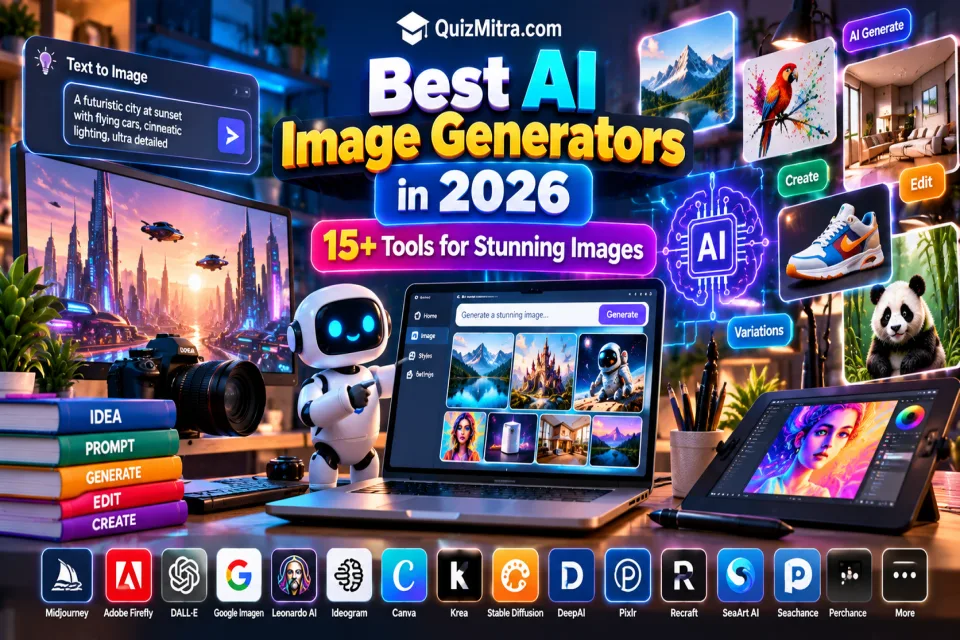
AI image generation has become one of the fastest-growing areas of artificial intelligence. Instead of spending hours creating every visual manually, creators can now describe an idea in natural language and generate images, illustrations, concepts and marketing visuals in seconds.
In 2026, there are hundreds of AI image tools available, ranging from advanced creative platforms to simple browser-based generators. Some focus on artistic images, while others are designed for product visuals, image editing, social media, advertising, concept art or professional design workflows.
In this guide, we explore the best AI image generators in 2026 and explain what each type of tool is useful for, who should consider it and what you should check before using generated images commercially.
QuizMitra's AI Tools Directory currently has a dedicated Image AI category with hundreds of image-generation and image-editing tools. ([quizmitra.com](https://quizmitra.com/?utm_source=chatgpt.com))
Table of Contents
- What Are AI Image Generators?
- How Do AI Image Generators Work?
- Best AI Image Generators in 2026
- Midjourney
- Adobe Firefly
- Google Imagen
- Krea
- DeepAI
- Pixlr
- Perchance AI Image Generator
- SeaArt AI
- Quick, Draw!
- How to Choose the Best AI Image Generator
- Best Free AI Image Generators
- What Can You Create With AI Image Generators?
- Tips for Better AI Image Prompts
- Can AI-Generated Images Be Used Commercially?
- Common AI Image Generation Mistakes
- Frequently Asked Questions
What Are AI Image Generators?
AI image generators are software tools that use artificial intelligence models to create or modify visual content from instructions, images or other inputs.
The most common workflow is text-to-image generation. You describe what you want, and the AI generates one or more visual results based on your prompt.
Modern image AI tools can also support workflows such as:
- Text-to-image generation
- Image-to-image transformation
- Image editing
- Background replacement
- Object removal
- Image expansion
- Image enhancement
- Style experimentation
- Concept development
- Product visualization
How Do AI Image Generators Work?
Most AI image generators use machine-learning models trained to understand relationships between text and visual concepts. When you enter a prompt, the system interprets your instructions and generates an image based on the model's learned patterns.
Depending on the platform, you may also be able to provide a reference image, select a visual style, change the aspect ratio, edit an existing image or generate multiple variations.
The exact technology differs between providers, so the quality, speed, controls and licensing terms can vary considerably.
A great AI image starts with a clear idea, a specific prompt and thoughtful human direction.
Best AI Image Generators in 2026
There is no single AI image generator that is perfect for everyone. Artists, marketers, bloggers, designers, students and businesses may need completely different features.
The following tools represent different approaches to AI image generation, editing and creative workflows.
1. Midjourney
Midjourney is an art-focused AI image generator known for creative visual exploration, concept art, moodboards, editorial imagery, character concepts and social visuals.
It is particularly interesting for creators who care about visual style, artistic direction and highly imaginative compositions.
QuizMitra currently lists Midjourney as a paid Image AI tool, with plans starting from USD 10, so it is not the best choice if your primary requirement is a completely free image generator. ([quizmitra.com](https://quizmitra.com/ai-tools/midjourney?utm_source=chatgpt.com))
Best for
- Concept art
- Creative illustrations
- Moodboards
- Character concepts
- Editorial visuals
- Creative experimentation
2. Adobe Firefly
Adobe Firefly is designed for AI-assisted creative workflows, including image generation and editing. It is especially relevant to designers, marketers and creators already working within Adobe's creative ecosystem.
Firefly can be useful for generating campaign concepts, social graphics, backgrounds, visual variations and other creative assets.
QuizMitra currently lists Adobe Firefly as a Freemium Image AI tool with a free plan and features including image generation, editing and generative fill. ([quizmitra.com](https://quizmitra.com/ai-tools/adobe-firefly?utm_source=chatgpt.com))
Best for
- Designers
- Marketing graphics
- Image editing
- Creative campaigns
- Background generation
3. Google Imagen
Google Imagen belongs to Google's family of image-generation technology and is designed for AI-assisted visual creation.
It can be relevant for creators interested in text-to-image generation, prompt-based image creation, variations and reference-image workflows.
QuizMitra currently lists Google Imagen as a Freemium Image AI tool with a free plan. Current access, models, regional availability and usage limits should always be checked before using it for production work. ([quizmitra.com](https://quizmitra.com/ai-tools/google-imagen?utm_source=chatgpt.com))
Best for
- Text-to-image experiments
- Creative visuals
- AI image exploration
- Reference-image workflows
4. Krea
Krea focuses on creative AI workflows that combine image generation, real-time visual iteration, editing and enhancement.
This makes it useful for creators who want to experiment quickly rather than generate one image and stop.
QuizMitra currently lists Krea as a Freemium Image AI tool with a free plan, image generation, editing, real-time workflows and upscaling capabilities. ([quizmitra.com](https://quizmitra.com/ai-tools/krea?utm_source=chatgpt.com))
Best for
- Creative exploration
- Real-time visual iteration
- Image enhancement
- Style experiments
- Product visuals
5. DeepAI
DeepAI provides AI image generation through a relatively straightforward interface and also offers developer-oriented API capabilities.
It can be useful for creators who want to experiment with generated illustrations, concepts and visual ideas without building their own image-generation system.
QuizMitra currently lists DeepAI as Freemium, with a free plan and API access. ([quizmitra.com](https://quizmitra.com/ai-tools/deepai?utm_source=chatgpt.com))
Best for
- AI image experiments
- Illustrations
- Concept visuals
- Developer experiments
- Image APIs
6. Pixlr
Pixlr combines conventional browser-based image editing with AI-assisted generation and editing features.
This makes it particularly useful when you need more than simply generating an image from a prompt. You can use AI-assisted workflows for tasks such as background removal, object removal, image generation and resizing.
QuizMitra currently lists Pixlr as a Freemium Image AI tool with a free plan and features including AI image generation, generative fill, background removal and object removal. ([quizmitra.com](https://quizmitra.com/ai-tools/pixlr?utm_source=chatgpt.com))
Best for
- Social media graphics
- Quick image editing
- Background removal
- Object removal
- Browser-based editing
7. Perchance AI Image Generator
Perchance AI Image Generator is an accessible option for experimenting with AI-generated visuals, illustrations and creative concepts.
It can be useful for creators who want to test image-generation ideas without setting up a complicated workflow.
QuizMitra currently lists Perchance as a Freemium Image AI tool with a free plan and image-generation capabilities. Users should check the current official terms for usage limits and commercial licensing. ([quizmitra.com](https://quizmitra.com/ai-tools/perchance-ai-image-generator?utm_source=chatgpt.com))
Best for
- Creative experiments
- Concept art
- Blog illustrations
- Social visuals
- AI art exploration
8. SeaArt AI
SeaArt AI provides an AI image creation environment with multiple models and community-oriented workflows.
It can be useful for creators interested in illustrations, character concepts, anime-inspired artwork and style experimentation.
QuizMitra currently lists SeaArt AI as a Freemium Image AI tool with image generation, API capabilities and community-model workflows. ([quizmitra.com](https://quizmitra.com/ai-tools/seaart-ai?utm_source=chatgpt.com))
Best for
- Character concepts
- Illustrations
- Anime-style artwork
- Style experiments
- Creative communities
9. Quick, Draw!
Quick, Draw! is listed in QuizMitra's Image AI ecosystem as an image-focused tool for AI-assisted visual workflows.
The directory currently describes it around image editing, visual experimentation, object changes, retouching and image adjustments. Because AI products and their capabilities can change, check the official product documentation before relying on a specific feature. ([quizmitra.com](https://quizmitra.com/ai-tools/quick-draw?utm_source=chatgpt.com))
Best for
- Visual experimentation
- Image editing
- Creative iteration
- AI-assisted image workflows
More AI Image Tools Worth Exploring
The AI image ecosystem is much larger than the tools listed above. Depending on your requirements, you can also explore platforms for image editing, generation, enhancement, design and specialized visual workflows.
QuizMitra's Image AI directory currently contains hundreds of tools, making it useful when you want to compare different options rather than relying on a single generator. ([quizmitra.com](https://quizmitra.com/?utm_source=chatgpt.com))
AI Image Generators Comparison
| Tool | Best For | Pricing Type |
|---|---|---|
| Midjourney | Creative art & concept visuals | Paid |
| Adobe Firefly | Design & image editing | Freemium |
| Google Imagen | AI image generation | Freemium |
| Krea | Real-time creative workflows | Freemium |
| DeepAI | Generation & API experiments | Freemium |
| Pixlr | Image generation & editing | Freemium |
| Perchance | Creative image experiments | Freemium |
| SeaArt AI | Illustrations & character art | Freemium |
Pricing, free credits, features and commercial-use policies can change. Always check the provider's current terms before making a purchasing or business decision.
How to Choose the Best AI Image Generator
The most expensive or popular image generator is not automatically the best choice. Consider what you actually need to create.
1. Decide What You Want to Create
Are you creating blog images, advertisements, social media graphics, product images, illustrations, concept art or realistic photographs?
2. Check the Generation Quality
Generate several examples using similar prompts and compare the results. Pay attention to details, composition, hands, faces, text and consistency.
3. Check Editing Features
If you need to modify existing images, choose a tool that provides the editing controls you actually need.
4. Check Free Usage
Many platforms offer free credits or free plans, but the limits can vary. Check generation limits, resolution, queues and export restrictions.
5. Check Commercial Licensing
If you are creating images for a business, advertisements or products, carefully review the provider's current commercial-use and licensing terms.
Best Free AI Image Generators in 2026
If your primary requirement is free AI image generation, start by exploring tools that currently offer free plans or free access.
- Adobe Firefly — free plan available
- Google Imagen — free plan listed by QuizMitra
- Krea — free option available
- DeepAI — free option available
- Pixlr — free tools available
- Perchance AI Image Generator — free plan listed
- SeaArt AI — freemium access
These plans should be treated as a starting point rather than unlimited free access. Usage limits, credits and available features can change. ([quizmitra.com](https://quizmitra.com/ai-tools/krea?utm_source=chatgpt.com))
What Can You Create With AI Image Generators?
AI image generators are useful across many creative and professional workflows.
Blog Images
Create article hero images, illustrations, diagrams and supporting visuals for blog content.
Social Media Graphics
Generate concepts for Instagram posts, Facebook graphics, LinkedIn visuals, Pinterest images and other social content.
YouTube Thumbnails
AI can help generate thumbnail concepts, backgrounds, characters and visual compositions.
Marketing & Advertising
Marketers can experiment with campaign concepts, product scenes, backgrounds and promotional visuals.
Product Concepts
Designers can visualize product ideas and explore different environments, compositions and creative directions.
Educational Content
Teachers and educational creators can develop illustrations, visual explanations, posters and learning materials.
Creative Projects
Artists and creators can use AI to explore characters, environments, concepts and alternative visual directions.
Tips for Writing Better AI Image Prompts
The quality of your prompt can significantly affect the result. Instead of writing only a few generic words, describe the important visual details.
Include the Subject
Clearly describe what should appear in the image.
Describe the Environment
Mention the location, background and surrounding elements.
Specify the Visual Style
You can describe whether you want a realistic photograph, 3D render, illustration, cinematic scene, editorial image or another visual direction.
Specify Composition
Tell the model whether the subject should be centered, close-up, wide-angle, overhead or positioned to one side.
Mention Lighting
Lighting descriptions such as soft studio lighting, dramatic cinematic lighting or natural daylight can help establish the visual mood.
For example:
"Create a premium 3D educational illustration showing a student using an AI image generator on a laptop, surrounded by colorful digital image cards, books and creative tools, cinematic lighting, modern workspace, high detail, landscape composition."
You can explore more ready-to-use prompts through the QuizMitra AI Prompt Library.
Can AI-Generated Images Be Used Commercially?
Commercial use depends on the specific AI provider, model, plan and applicable licensing terms. There is no universal rule that applies to every AI image generator.
Before using an AI-generated image in advertising, products, client work, websites or other commercial projects, check:
- Commercial-use permissions
- Ownership terms
- Model-specific restrictions
- Free-plan limitations
- Content restrictions
- Trademark considerations
- Copyright-related requirements
For example, QuizMitra's Adobe Firefly listing includes commercial-use information, while other tools may have different terms. Always check the provider's latest official documentation before commercial publication. ([quizmitra.com](https://quizmitra.com/ai-tools/adobe-firefly?utm_source=chatgpt.com))
Common AI Image Generation Mistakes
1. Using Extremely Short Prompts
A prompt such as "beautiful AI image" provides very little direction. Add subject, environment, style and composition.
2. Ignoring Image Dimensions
Choose the aspect ratio according to where the image will be used. Blog banners, Instagram posts, stories and YouTube thumbnails may require different dimensions.
3. Trusting AI-Generated Text
Text inside generated images can contain spelling mistakes or distorted characters. For important designs, inspect all generated text carefully.
4. Not Checking Faces and Hands
Even strong image models can sometimes produce unwanted visual artifacts. Always inspect important people, objects and details.
5. Ignoring Licensing
Never assume that an image can automatically be used commercially simply because an AI tool generated it.
AI Image Generator vs Traditional Design
| Factor | AI Image Generation | Traditional Design |
|---|---|---|
| Initial concept speed | Very fast | Usually slower |
| Creative exploration | Very high | High |
| Precise manual control | Varies by tool | Very high |
| Editing | Tool dependent | Extensive |
| Learning curve | Often lower initially | Can be higher |
| Human creativity | Still essential | Central |
In practice, the strongest workflow is often a combination of AI generation and human editing rather than choosing only one approach.
Explore More AI Image Tools on QuizMitra
The AI image ecosystem is expanding rapidly. New generators, editors, enhancement tools and specialized platforms appear regularly.
QuizMitra's Image AI Directory lets you explore a large collection of image-related AI tools and discover options based on their features and pricing.
You can also explore:
Frequently Asked Questions
What is the best AI image generator in 2026?
There is no single best tool for every user. Midjourney is focused on artistic visual generation, Adobe Firefly is useful for creative and editing workflows, while tools such as Krea, Pixlr and DeepAI offer different combinations of generation and editing capabilities.
What is the best free AI image generator?
Several platforms currently offer free plans or free access, including Krea, DeepAI, Pixlr, Adobe Firefly, Google Imagen and Perchance according to current QuizMitra directory information. Free limits and features vary between providers. ([quizmitra.com](https://quizmitra.com/ai-tools/krea?utm_source=chatgpt.com))
Is Midjourney free?
QuizMitra currently lists Midjourney as a paid Image AI tool, with plans starting from USD 10. ([quizmitra.com](https://quizmitra.com/ai-tools/midjourney?utm_source=chatgpt.com))
Can AI generate realistic images?
Yes. Modern image-generation systems can produce highly detailed and realistic-looking visuals. However, results vary according to the model, prompt, subject and generation settings.
Can I use AI-generated images for my website?
In many cases, yes, but you should check the specific provider's current licensing and commercial-use terms before publishing an image.
Can AI image generators create YouTube thumbnails?
Yes. AI image tools can help create thumbnail backgrounds, characters, concepts and visual compositions. Text and important visual details should be checked carefully before publishing.
Where can I find more AI image tools?
Visit the QuizMitra Image AI Directory to explore more image-generation and image-editing tools.
Conclusion
AI image generators have become powerful creative tools for bloggers, designers, marketers, students, businesses, YouTubers and social media creators.
The best choice depends on what you want to create. If you need artistic exploration, a specialized image generator may be ideal. If you need editing and design capabilities, a platform combining generation with image editing may be more useful.
Before choosing a tool, compare image quality, generation speed, editing capabilities, free limits, output resolution and commercial licensing.
Most importantly, remember that AI is a creative assistant. The quality of the final result still depends heavily on your idea, prompt, editing and creative direction.
Explore hundreds of image-related tools in the QuizMitra Image AI Directory and find the right tool for your next creative project.
Quiz Mitra — Learn. Play. Compete.