Content creation has changed dramatically with the growth of artificial intelligence. Bloggers, YouTubers, Instagram creators, marketers, designers and independent creators can now use AI to speed up research, writing, image creation, video editing, social media production and content optimization.
But AI is not about replacing creativity. The biggest advantage comes from using AI to handle repetitive work while the creator focuses on ideas, storytelling, originality and audience connection.
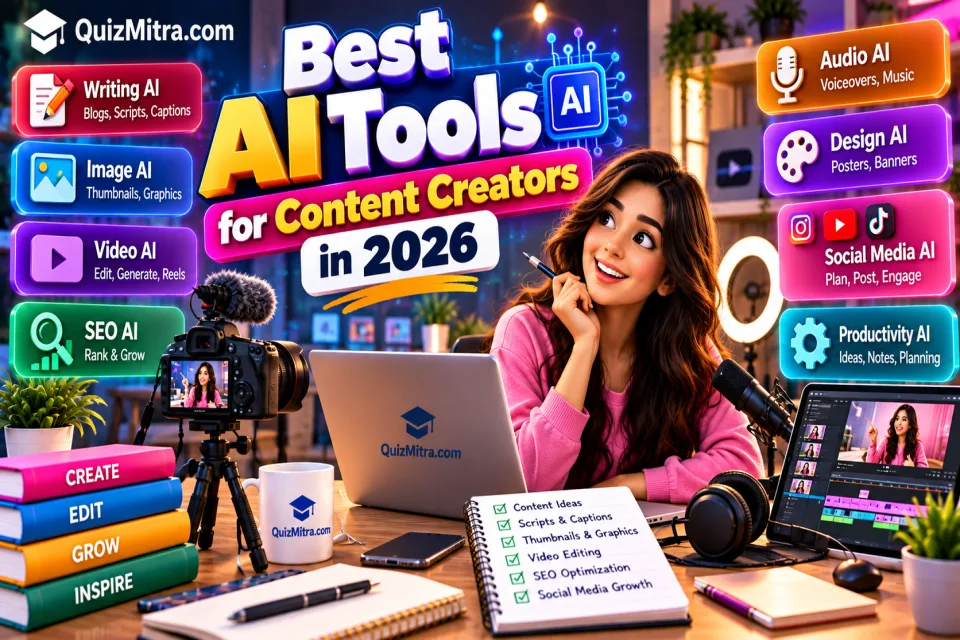
In this guide, we explore the best AI tools for content creators in 2026, covering writing, research, images, video, social media, SEO, audio, design and productivity.
You can also discover hundreds of additional tools through the QuizMitra AI Tools Directory, where tools can be explored by category, pricing and features.
Table of Contents
- Why Content Creators Are Using AI
- How AI Fits Into the Content Creation Workflow
- Best AI Writing Tools
- Best AI Research Tools
- Best AI Image Tools
- Best AI Video Tools
- Best AI Tools for Social Media
- Best AI SEO Tools
- Best AI Audio & Voice Tools
- Best AI Design Tools
- Best AI Productivity Tools
- Best AI Tools by Creator Type
- Best Free AI Tools for Creators
- How to Build an AI Content Workflow
- Common AI Content Creation Mistakes
- Frequently Asked Questions
Why Are Content Creators Using AI in 2026?
Creating quality content requires much more than publishing a post. A typical content workflow can involve topic research, keyword research, outlining, writing, editing, graphic design, video production, thumbnails, captions, publishing and performance analysis.
AI can assist with many of these repetitive tasks, allowing creators to spend more time developing ideas and connecting with their audience.
For example, a creator can use AI to generate a first draft, create image concepts, turn a long video into short clips, generate captions or brainstorm content ideas.
QuizMitra's AI directory currently separates tools into categories such as Writing AI, Image AI, Video AI, SEO AI, Design AI, Audio AI, Business AI and more, making it easier for creators to find tools for specific tasks. :chatgpt-content-reference{index="0"}
How AI Fits Into the Content Creation Workflow
A useful AI-assisted content workflow can look like this:
- Research: Find topics, questions and useful information.
- Planning: Create content angles, outlines and hooks.
- Writing: Draft articles, scripts, captions or newsletters.
- Visuals: Create images, thumbnails, graphics or illustrations.
- Video: Generate, edit, caption or repurpose videos.
- Optimization: Improve titles, descriptions, keywords and structure.
- Distribution: Adapt the content for different platforms.
- Analysis: Review performance and improve future content.
The goal is not to automate every step. The strongest workflow combines AI assistance with human creativity, expertise and editorial judgment.
AI can make content creation faster, but your ideas, experience and creativity make the content valuable.
Best AI Writing Tools for Content Creators
Writing is one of the most common areas where creators use AI. Writing assistants can help with brainstorming, outlines, rewriting, editing, captions, scripts, blog drafts and marketing copy.
1. ChatGPT
ChatGPT can assist creators with content ideas, article outlines, video scripts, social captions, newsletters, brainstorming and rewriting.
It is particularly useful when the creator provides detailed context about the audience, platform, tone and desired format.
2. Claude
Claude is useful for long-form writing, document analysis, rewriting, research, outlines and content development. QuizMitra describes Claude as a writing-focused assistant with strong long-document and reasoning workflows. :chatgpt-content-reference{index="1"}
3. Gemini
Gemini can help creators brainstorm, draft, rewrite, summarize and organize content. QuizMitra currently lists Gemini as a freemium writing AI tool with a free plan and API. :chatgpt-content-reference{index="2"}
4. Simplified
Simplified combines AI writing with design, video and social publishing workflows. It can be useful for creators who want several content-production capabilities in one platform. QuizMitra currently lists a free plan. :chatgpt-content-reference{index="3"}
5. Writesonic
Writesonic provides AI-assisted writing and content workflows for marketers, publishers and creators.
6. Copy.ai
Copy.ai focuses on AI-assisted marketing and content workflows, including copywriting and business content.
7. QuillBot
QuillBot can help creators paraphrase, summarize and improve existing text.
Explore more options in the Writing AI Tools category.
Best AI Research Tools for Content Creators
Good content starts with good research. AI research tools can help creators discover topics, organize information and identify questions their audience may be interested in.
8. Perplexity
Perplexity is designed around conversational search and research workflows. It can help creators explore a topic before developing an article, video or social post.
9. Elicit
Elicit is designed around academic and research workflows and can be useful for creators producing research-heavy educational or technical content.
10. NotebookLM
NotebookLM can help users work with provided source material and explore information through AI-assisted summaries and questions.
11. Google AI Studio
Google AI Studio can be useful for creators and developers experimenting with AI models, prompts and AI-powered workflows.
Remember that AI-generated research should be verified before publication. Important claims should be checked against original or authoritative sources.
Best AI Image Tools for Content Creators
Visual content is critical for blogs, YouTube thumbnails, Instagram posts, advertisements, presentations and social media.
12. Adobe Firefly
Adobe Firefly provides AI-assisted image generation and editing capabilities for creative workflows. QuizMitra currently lists it as an Image AI tool with a freemium plan. :chatgpt-content-reference{index="4"}
13. Google Imagen
Google Imagen is focused on AI image generation and visual workflows. Creators should check the current product documentation for access, licensing and usage limits before commercial use. :chatgpt-content-reference{index="5"}
14. Canva AI
Canva combines traditional design workflows with AI-assisted features, making it useful for social posts, presentations, thumbnails and marketing graphics.
15. Ideogram
Ideogram can be useful for creating visual concepts where typography, posters and text-based designs are important.
16. Leonardo AI
Leonardo AI provides AI-assisted creative image-generation workflows for creators and designers.
Browse additional options in Image AI Tools.
Best AI Video Tools for Content Creators
Video creators can use AI to generate footage, edit clips, create captions, produce short-form content and experiment with new visual styles.
17. CapCut
CapCut provides AI-assisted short-form editing, captions, transcription, video cleanup and social-video workflows. QuizMitra currently lists it as a freemium Video AI tool. :chatgpt-content-reference{index="6"}
18. Luma Dream Machine
Luma Dream Machine focuses on short generative video and image-to-video workflows and is particularly relevant for creators experimenting with AI-generated visual content. :chatgpt-content-reference{index="7"}
19. Vidu
Vidu provides short AI video generation with reference-image workflows. QuizMitra currently lists a freemium option and API access. :chatgpt-content-reference{index="8"}
20. Veo
Google's Veo is focused on generative video models, including supported audio capabilities. It can be useful for social, marketing and educational video experiments. :chatgpt-content-reference{index="9"}
21. Captions
Captions focuses on mobile-first AI-assisted video editing and short-form content workflows. :chatgpt-content-reference{index="10"}
22. Topview
Topview focuses on AI-assisted product and social advertising videos, making it relevant to creators producing promotional content. :chatgpt-content-reference{index="11"}
Explore more tools in the Video AI Tools category.
Best AI Tools for Social Media Content
Social media creators often need to produce content consistently across multiple platforms. AI can help with captions, post ideas, repurposing, scheduling and content planning.
23. Buffer
Buffer supports social-media publishing and can help creators manage content distribution across supported platforms.
24. Publer
Publer is focused on social publishing workflows and can help creators organize and publish social content. QuizMitra currently lists a free plan. :chatgpt-content-reference{index="12"}
25. Simplified
Simplified combines AI writing with social-content and publishing workflows, making it useful for creators managing multiple content formats. :chatgpt-content-reference{index="13"}
26. Canva
Canva can help creators produce social graphics, posts, stories, thumbnails and other visual assets.
Best AI SEO Tools for Content Creators
Publishing content is only one part of content marketing. Creators also need to understand search intent, keywords, content structure and optimization.
27. Surfer AI
Surfer AI focuses on creating search-oriented content around target keywords and content requirements. QuizMitra currently lists it as a Writing AI tool. :chatgpt-content-reference{index="14"}
28. GetGenie AI
GetGenie AI can assist with keyword-focused content, blog posts and SEO-oriented writing workflows. QuizMitra currently lists a freemium option. :chatgpt-content-reference{index="15"}
29. NeuralText
NeuralText is focused on content and SEO workflows for creators and marketers.
30. Writer
Writer focuses on controlled business writing, brand voice and content governance, making it more relevant to professional teams and larger content operations. :chatgpt-content-reference{index="16"}
Explore more tools through the SEO AI Tools category.
Best AI Audio & Voice Tools for Creators
Podcasts, YouTube videos, reels and educational content often require voiceovers, narration, transcription or audio editing.
31. ElevenLabs
ElevenLabs focuses on AI-generated voices and speech-related creative workflows. It can be useful for narration, voiceovers and other supported audio projects.
32. Descript
Descript combines transcription with audio and video editing workflows, helping creators edit spoken content more efficiently.
33. Suno
Suno focuses on AI-assisted music generation and can be useful for creators experimenting with original audio concepts.
Best AI Design Tools for Content Creators
Creators frequently need thumbnails, social graphics, presentations, posters, banners and other visual assets.
- Canva AI — social graphics, presentations and visual content.
- Adobe Firefly — AI-assisted image generation and editing.
- Microsoft Designer — quick AI-assisted visual design.
- Ideogram — visual concepts and typography-focused designs.
- Leonardo AI — creative image generation and visual experimentation.
You can explore additional options in the Design AI Tools category.
Best AI Productivity Tools for Creators
Content creators are effectively running small media businesses. Planning, organization and consistent publishing are therefore just as important as creativity.
34. Notion AI
Useful for organizing content ideas, notes, calendars, project information and written material.
35. Gamma
Gamma can help creators turn ideas into presentations and structured visual documents.
36. Napkin AI
Napkin AI can transform text and ideas into visual explanations and diagrams, which can be useful for educational and business creators.
37. Otter.ai
Otter.ai can assist with transcription and meeting or interview notes, helping creators turn conversations into usable source material.
Best AI Tools by Creator Type
| Creator Type | Useful AI Categories | Common Use Cases |
|---|---|---|
| Bloggers | Writing, SEO, Research | Articles, research, outlines and optimization |
| YouTubers | Writing, Video, Audio | Scripts, editing, captions and voiceovers |
| Instagram Creators | Image, Video, Writing | Reels, captions, graphics and content ideas |
| Podcasters | Audio, Writing, Research | Research, scripts, transcription and editing |
| Digital Marketers | SEO, Writing, Design | Ads, blogs, social posts and campaigns |
| Educators | Writing, Video, Image, Education | Lessons, presentations, quizzes and educational videos |
| Designers | Image, Design, Video | Concepts, graphics, visual assets and editing |
Best Free AI Tools for Content Creators
You do not necessarily need dozens of paid subscriptions to start creating with AI. Many products offer free plans, trials or limited free access.
Some useful starting points include:
- ChatGPT
- Claude
- Gemini
- Canva
- Adobe Firefly
- CapCut
- Vidu
- Luma Dream Machine
- Simplified
- Publer
However, free plans can have restrictions on credits, generations, exports, models or features. Always check the current pricing before choosing a tool for a long-term workflow.
QuizMitra's AI directory lets creators discover tools across multiple categories and compare their available pricing information. :chatgpt-content-reference{index="17"}
How to Build an AI Content Creation Workflow
Instead of using AI randomly, creators can build a repeatable workflow.
Step 1: Find a Content Idea
Start with your audience. Identify a problem, question, trend or topic that is genuinely useful to your viewers or readers.
Step 2: Research the Topic
Use research tools to collect information and identify useful angles. Always verify important claims using reliable sources.
Step 3: Create an Outline
Ask AI to generate several possible structures, then select and improve the one that best fits your audience.
Step 4: Create the First Draft
AI can help generate an initial draft, but the creator should add personal experience, examples, opinions and original insights.
Step 5: Create Visual Assets
Use image or design tools to create thumbnails, illustrations, social graphics and supporting visuals.
Step 6: Repurpose the Content
A long article can become a YouTube script, Instagram carousel, LinkedIn post, short video or newsletter.
Step 7: Review Before Publishing
Check facts, copyright considerations, brand voice, originality, captions, visuals and AI-generated errors before publication.
A Simple AI Content Workflow Example
Imagine you are creating a YouTube video about the best productivity apps for students.
- Use an AI research assistant to brainstorm topics.
- Use ChatGPT, Claude or Gemini to develop the video structure.
- Write and personally edit the script.
- Use an image tool for thumbnail concepts.
- Use an AI video editor for captions and editing.
- Use an audio tool for supported voice workflows.
- Create a YouTube title and description.
- Repurpose the video into short-form social content.
The creator remains responsible for the final content. AI simply helps reduce repetitive production work.
Common AI Content Creation Mistakes
1. Publishing Raw AI Output
AI-generated content often needs editing, fact-checking and personalization. Publishing raw output can result in generic or inaccurate content.
2. Using AI Without a Strategy
More AI tools do not automatically mean better content. Choose tools based on the actual problem you need to solve.
3. Removing the Human Voice
Audiences follow creators because of their perspective and personality. Your personal experience and point of view should remain visible.
4. Ignoring Copyright and Licensing
Before using AI-generated images, music, voices or other assets commercially, check the provider's current licensing terms and any restrictions that apply.
5. Creating Too Much Low-Quality Content
AI makes content production faster, but publishing more content is not automatically better. Focus on useful, original and audience-focused content.
How to Choose the Right AI Tool
Before adding another AI subscription to your workflow, ask these questions:
- What specific problem does the tool solve?
- Does it fit my current workflow?
- Is there a free plan?
- What are the usage limits?
- Can I export my work?
- Can I use the output commercially?
- How does the service handle my data?
- Does it actually save me time?
If the answer to the last question is no, you probably do not need another AI tool.
Explore More AI Tools on QuizMitra
The AI ecosystem changes rapidly. New tools and features are launched regularly, while existing platforms change their pricing and capabilities.
Instead of searching across multiple websites, creators can use the QuizMitra AI Tools Directory to discover tools by category and pricing.
You can also explore the QuizMitra AI Prompt Library for ready-to-use prompts for content creation.
Frequently Asked Questions
What are the best AI tools for content creators in 2026?
The best tool depends on the type of content you create. ChatGPT, Claude and Gemini can help with writing and brainstorming, while tools such as Adobe Firefly and Ideogram can assist with images. Video creators can explore tools such as CapCut, Luma Dream Machine, Vidu and Veo.
What is the best AI tool for YouTubers?
YouTubers typically need several types of tools rather than one tool: writing tools for scripts, video tools for editing, image tools for thumbnails and audio tools for narration or transcription.
Are there free AI tools for content creators?
Yes. Many AI products offer free plans or limited free access. However, limits on credits, exports, generations and advanced features vary by tool.
Can AI create a complete blog post?
AI can help create a draft, outline or sections of a blog post. However, creators should add original information, verify facts, edit the content and ensure the final article provides genuine value to readers.
Can AI help Instagram creators?
Yes. AI can assist with content ideas, captions, images, reels, video editing, scripts and content repurposing.
Can AI replace content creators?
AI can automate parts of content production, but successful content still benefits from human creativity, experience, storytelling, judgment and audience understanding.
Where can I discover more AI tools?
Visit the QuizMitra AI Tools Directory to explore AI tools across writing, image, video, SEO, coding, education, design, audio and other categories.
Conclusion
AI is becoming an important part of modern content creation. Whether you are a blogger, YouTuber, Instagram creator, podcaster, marketer, educator or independent creator, AI can help you research ideas, write drafts, create visuals, edit videos, optimize content and manage repetitive tasks.
But the biggest advantage does not come from using the most AI tools. It comes from building a smart workflow around the tools that genuinely save time and improve your content.
Start with one problem, choose one suitable AI tool, test it and measure whether it actually improves your workflow. Then gradually add other tools when there is a real need.
Explore more options in the QuizMitra AI Tools Directory and discover ready-to-use ideas in the AI Prompt Library.
Quiz Mitra — Learn. Play. Compete.